P12994 [GCJ 2022 #2] Pixelated Circle
题目描述
典型的计算机图像是由像素组成的矩阵,每个像素是一个特定颜色的小方块。绘制不完美平行于像素矩阵坐标轴的线条会导致瑕疵,而绘制圆形则是这种瑕疵的极端例子。
假设我们有一张由 $2 \mathbf{R}+1$ 行 $2 \mathbf{R}+1$ 列像素组成的图片,像素的行和列编号从 $-\mathbf{R}$ 到 $\mathbf{R}$,中心像素位于第 0 行第 0 列。初始时,所有像素均为白色。然后,可以通过以下伪代码绘制一个半径为 $\mathbf{R}$ 且居中的黑色圆,其中 `set_pixel_to_black` $(x, y)$ 将第 $x$ 行第 $y$ 列的像素设为黑色:
```
draw_circle_perimeter(R):
for x between -R and R, inclusive {
y = round(sqrt(R * R - x * x)) # round to nearest integer, breaking ties towards zero
set_pixel_to_black(x, y)
set_pixel_to_black(x, -y)
set_pixel_to_black(y, x)
set_pixel_to_black(-y, x)
}
```
注意,某些像素可能被多次设为黑色,但该操作是幂等的(即对已经是黑色的像素调用 `set_pixel_to_black` 不会有任何效果)。
以下是绘制实心圆的伪代码(从全白图片开始):
```
draw_circle_filled(R):
for x between -R and R, inclusive {
for y between -R and R, inclusive {
if round(sqrt(x * x + y * y))
输入格式
第一行输入测试用例数量 $\mathbf{T}$。随后 $\mathbf{T}$ 行,每行包含一个整数 $\mathbf{R}$,表示要绘制的圆的半径。
输出格式
对于每个测试用例,输出一行 `Case #x: y`,其中 $x$ 为用例编号(从 1 开始),$y$ 为两张图片中颜色不同的像素数量。
说明/提示
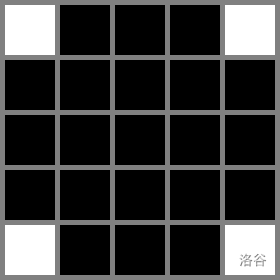
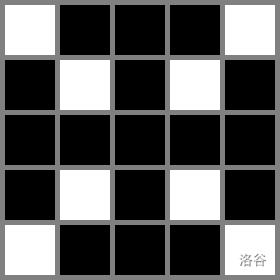
在样例 #1 中,调用 `draw_circle_filled(2)` 会绘制 21 个黑色像素(左图),调用 `draw_circle_filled_wrong(2)` 会绘制 17 个黑色像素(右图)。两张图片中有 4 个像素颜色不同:$(-1,-1)$、$(-1,1)$、$(1,-1)$ 和 $(1,1)$,其中 $(x, y)$ 表示第 $x$ 行第 $y$ 列的像素,行列编号如题目描述所示。
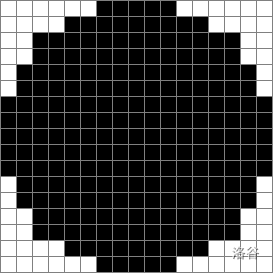
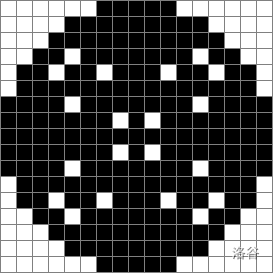
在样例 #2 中,左图和右图分别是调用 `draw_circle_filled(8)` 和 `draw_circle_filled_wrong(8)` 生成的图片。
**数据范围**
- $1 \leq \mathbf{T} \leq 100$。
**测试集 1(5 分,可见判定)**
- 时间限制:10 秒。
- $1 \leq \mathbf{R} \leq 100$。
**测试集 2(隐藏判定)**
- 时间限制:15 秒。
- $1 \leq \mathbf{R} \leq 10^{5}$。
翻译由 DeepSeek V3 完成