SP8542 POCALC2 - Modern Pocket Calculator
Description
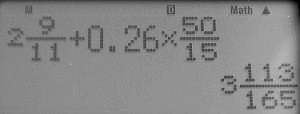
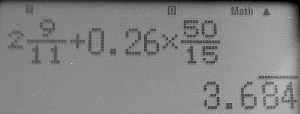
Adam likes pocket calculators, not only the [early ones](../../problems/POCALC1/), but also the modern ones with a two line LCD-display and mathematically correct operator precedence. The upper (input-)line shows the expression you typed in, the (output-)line below shows the result immediately after the \[=\] key has been pressed. Given the calculator's input-line, the program's task is to produce its output-line. Using the calculator's \[S-D\] key, the display switches between fractional and decimal representation of the result, so output must contain both representations.
Input Format
Input starts with a positive integer t (t
Output Format
For each testcase print the result the calculator will display in its output-line: first fractional, then decimal, both representations separated by " \[S-D\] ". If a result is negative, the negative sign has to be printed directly (i.e. no space) in front of the integer part or the fraction bar.
The fractional representation has to be printed in lowest terms either as a proper fraction or mixed number. If the number has an integer representation, that has to be printed instead. Numerator and denominator have to be placed as described in the input section.
After " \[S-D\] " the exact(!) decimal represenation has to be printed. As the screenshot shows, the calculator is even able to display a repeating decimal in its decimal representation using a vinculum, so that's what the program has to do as well, using underscores in the line above. You can assume that no decimal expansion is longer than 100 digits (it's a calculator with XXL-display).
The number of lines for every output depends on the result. It may be three lines (if fractions appear) or a single line (if result is an integer). Print a blank line after every testcase except the last one. Be careful not to print any trailing spaces.
**For more clarity of input and output format please look at the examples below.**